


Smart Home Technology for 2024 – The Future is Here
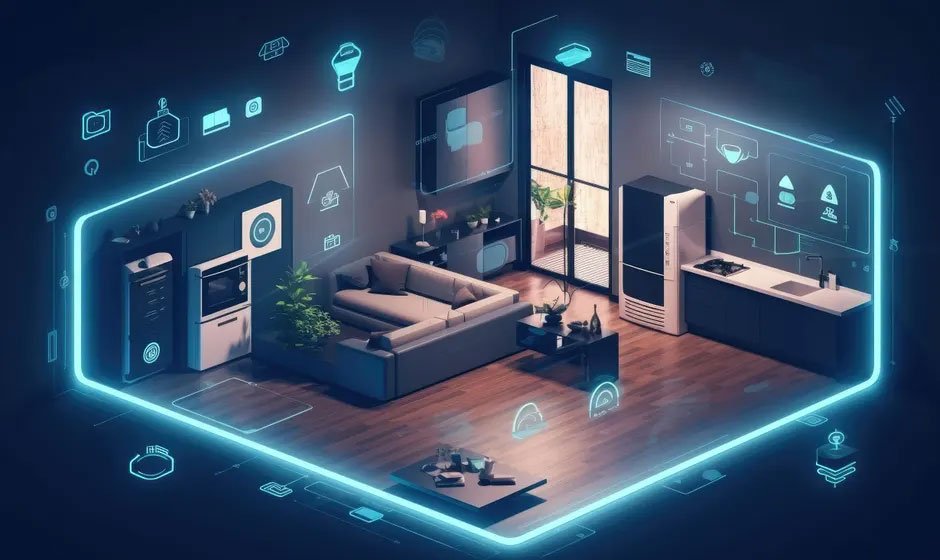
The Internet of Things is finally up and running and this is the platform that empowers homeowners by enabling smart technology to manage the home. Devices and appliances can talk to each other and a smart home is managed by a central computer; in this short article, we take a look at the tech used in a smart home.
Home theatre
An OLED flat screen TV in combination with sub-woofer Bluetooth speakers and an amplifier where you control the system. Your HDMI cable can be used to project to a second screen and all this can be controlled with a mobile app. Of course, hi-speed Internet brings you Netflix or live sports events; with the Dolby surround sound, you can sit in the right place and immerse yourself in the atmosphere.
Entertainment
Broadband Internet allows you to pipe audio and video throughout the home, using HDMI cables, you can connect as many screens as you wish. Play your favourite playlists in the shower with a waterproof Bluetooth speaker, indeed, you can pipe music to any room and connect to your secure cloud network.
Remote management
Using mobile apps and the web, you can manage your home from any location; turn on the climate control as you leave the office and your interior will be nice and cool; a sensor on your car opens the gates when you arrive home, which automatically close after you. Set the oven to start cooking so that it will be ready when you arrive, while you can issue other instructions. Click here for how to transform a dated home into a smart one.
Remote viewing
When you take your annual vacation, you can view your CCTV cameras from your smartphone; you can turn the camera and zoom in and out. This brings peace of mind when you are on the other side of the world. If you are out and someone arrives, an automated message is broadcast and communication can happen.
Self-sufficient clean energy
The smart home runs on solar energy, with panels on the roof and a bank of lithium-ion batteries; you can sell excess electricity to the national grid. A central control interface maintains energy use and distribution, allowing you to program things; you can use stored energy or run direct from the solar panels.
Smart home security
The 21st century home is protected with several security systems; motion sensors surround the property, which activate bright LED spotlights; don’t worry, pets will not trigger the system. If a person approaches the main gates, an AI generated voice will politely enquire as to the purpose of the visit. Of deemed appropriate, you will be notified by your smart home that you have a visitor. If it is a delivery, a hatch will open and the package can be deposited. No one gets into a smart home unless approved, which sure helps you sleep well at night. There is always the option for an infrared home security system if you want an extra barrier; most homes are fine with video surveillance and motion detection.
Climate control
Ducted a/c is the obvious choice, with a state-of-the-art HVAC system that can be fully zoned off and this gives you warmth in the winter, as the heat exchangers are reversible. A whole house climate control system can be fully integrated into a smart home system, allowing you remote management using an app.
Fire protection
Smoke detectors throughout the property can trigger a number of things, an automated call to the nearest fire station and, of course, a call to your smartphone. The true smart home would have sprinklers to automatically extinguish a fire, which is more than a little comforting.
If you would like to learn how to turn your home into a smart home, start with a Google search to find a local locksmith who can supply and install a state-of-the-art home management system. Over time, you can integrate many aspects of home management into the smart system, which makes life easy.
We are moving into a new dimension of digital connectivity and home management is a game-changer and something that brings with it many benefits.

![How to Make Your Home Office Comfortable in Any Season [Image Source] Working from home has become the new normal for many people. Whether it’s full-time or just a few days each week, a lot of us have turned spare bedrooms, garages, or corners of the living room into offices. While setting up a work-from-home space is easy in theory, making it a place you actually want to spend time in takes a little more thought. Comfort goes beyond a desk and a chair. It’s about lighting, temperature, air quality, and the overall feel of the space. When the room is too hot in the summer or freezing in the winter, it’s hard to stay focused. The wrong setup can leave you distracted, tired, and less productive. In this article, you’ll learn how to create a home office that feels comfortable no matter the season. These tips don’t require a complete renovation or a huge budget. They’re practical changes you can make now to upgrade your space and feel better throughout your workday. Choose the Right Heating and Cooling Setup Temperature plays a big role in how comfortable your office feels. If you’ve ever worked in a room that doesn’t stay warm in the winter or cool in the summer, you know how distracting that can be. A small change in temperature can affect your mood, focus, and even how your body feels after sitting for hours. Some home offices are in places that weren’t originally meant for year-round use—like finished basements, sunrooms, or attic spaces. These rooms often don’t get enough airflow from your home’s main heating and cooling system. That leads to hot spots in summer and cold zones in winter, which can make working from home feel like a chore. One way to handle this is by installing ductless mini-split systems. These allow you to control the climate in just one room without relying on your main HVAC system. They’re energy-efficient, easy to install in finished or unfinished spaces, and perfect for areas where running new ductwork isn't ideal. With a mini-split system, you can heat or cool your office independently from the rest of the house. That means you won’t waste energy adjusting the entire home just to stay comfortable during work hours. If you like your office cooler than the rest of the house—or if you’re using a room that’s always too hot—this gives you full control. These systems are also quiet, which helps if you're on video calls or need to concentrate without background noise. Instead of noisy window units or floor heaters, you get clean, steady temperature control without the hum or rattle. When your office stays at the right temperature all day, you’re more likely to stay focused, feel better, and get more done. Maximize Natural Light and Supplement Wisely Natural light can help you feel more alert and focused throughout the day. If possible, place your desk near a window. Morning sunlight boosts mood and energy, and exposure to natural light during the day can support better sleep at night. That said, natural light isn't always available—cloudy days, early mornings, or late evenings can make your office feel dim. Supplement with good-quality LED lighting. A desk lamp with adjustable brightness can help reduce eye strain. You can also add soft overhead lights for a balanced look that isn’t too harsh. Layering your lighting makes the space feel more comfortable. Combine ambient lighting with focused task lighting to create the right balance between visibility and relaxation. Use Smart Window Coverings Your windows play a big part in how well your office stays warm in the winter and cool in the summer. The right window coverings help block out heat during hot months and hold in warmth during colder ones. Blackout curtains or thermal blinds are a great choice for year-round comfort. In summer, they help keep the room from overheating during the day. In winter, they act as an extra barrier between your office and the cold air outside. Light-filtering shades are another option if you want to keep things bright while still reducing glare and heat. These coverings help manage indoor temperature without making the room feel closed off or dark. Add Functional Comfort Items Comfort doesn’t stop at temperature. The furniture and accessories you choose also affect how your body feels after hours at your desk. Start with your chair. It should support your back, allow your feet to rest flat on the floor, and adjust to your height. You don’t need a luxury brand—just something that helps you sit comfortably for long periods. A footrest can also help you relax your legs and improve posture. Placing a soft rug under your desk adds warmth and padding, which helps in both cold and hot seasons. Think about wrist support, desk height, and screen position. Small accessories like a keyboard tray or monitor stand can help reduce strain on your neck and shoulders. The goal is to stay comfortable without feeling stiff or sore by the end of the day. Improve Air Quality and Humidity Control Air quality plays a huge role in comfort and health. If your home office feels stuffy or stale, you might need to improve air circulation. A small air purifier can help reduce dust, pet dander, or allergens, especially useful in closed-off spaces. In winter, the air tends to get dry, which can cause dry skin, throat irritation, or even static shocks. A humidifier adds moisture to the air and helps you breathe better. In summer, excess humidity can make the room feel sticky and uncomfortable. In that case, a dehumidifier helps keep things in balance. Clean air and proper humidity levels support better focus and overall well-being, which makes your workday more productive. Keep Distractions Low with Sound Control Noise distractions can break your concentration fast. If your home office is near a busy street, a loud TV, or shared walls, you might need to block out sound. Start by adding soft materials like rugs, curtains, or fabric wall panels. These help absorb sound and reduce echo. You can also use a white noise machine or a fan to mask background noise during meetings or focus sessions. For windows and doors, add draft blockers or weather stripping to limit sound coming from outside. If you use video calls often, having a quiet space helps you speak and hear more clearly. A comfortable home office helps you work better through every season. With the right setup, you can stay focused and feel good during long hours at your desk. From smart heating and cooling to better lighting and air, small changes go a long way. Create a space that supports your goals—one that works for you all year.](https://lucykingdom.com/wp-content/uploads/2025/05/How-to-Make-Your-Home-Office-Comfortable-in-Any-Season-600x357.jpg)